
Best Photo-Sharing Ideas for Family Gatherings and Celebrations
Discover simple photo-sharing ideas for family gatherings, reunions, birthdays, anniversaries, and celebrations. Learn how to collect guest photos, create shared albums, and preserve family memories.
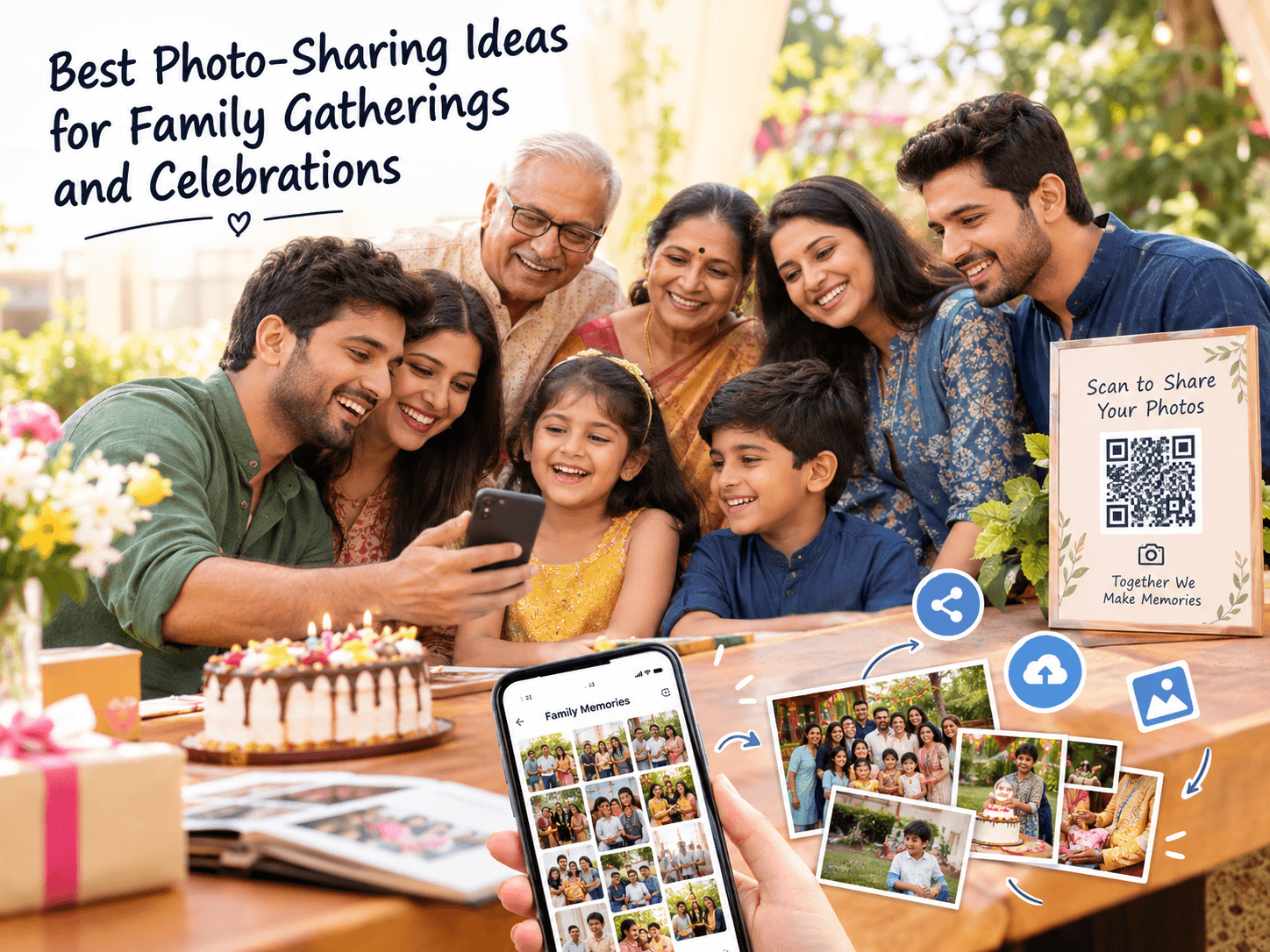
Family gatherings and celebrations bring people together to share laughter, stories, food, and unforgettable moments. Whether it is a birthday party, wedding anniversary, family reunion, festival, or weekend get-together, someone is always taking photos.
But after the celebration, those photos often end up scattered across different phones, messaging conversations, and social media accounts. One relative has the group pictures, another has the candid moments, and someone else has a video everyone wants to see.
The good news is that sharing family memories does not have to be complicated. With a little planning, you can make it easier for everyone to contribute photos and enjoy the memories together.
In this guide, we explore practical photo-sharing ideas for family gatherings and celebrations, including shared albums, QR codes, photo challenges, and simple ways to organize pictures after the event.
Why Family Photo Sharing Matters
A family celebration is experienced differently by every person who attends. Children might capture funny moments, grandparents may take family portraits, and cousins may photograph conversations and activities happening away from the main gathering.
When everyone keeps their pictures separately, the family misses the opportunity to enjoy those different perspectives.
A shared photo collection can bring those memories together. It gives relatives a way to contribute their photographs, discover moments they missed, and revisit the celebration later.
1. Create a Shared Family Photo Album
A shared family photo album is a simple way to bring pictures from different people into one collection. Instead of asking each relative to send photographs individually, create a central album for the gathering.
You can organize the album around a specific occasion, such as a family reunion, birthday, anniversary, holiday, or wedding celebration.
Choose a sharing method that is convenient for your family. Consider whether relatives can easily open it, upload photos, and view the collection on their phones.
A clearly named album also makes it easier to find the pictures again months or years later.
2. Use a QR Code to Collect Photos
A QR code can make photo sharing convenient at family events. It provides a quick way for guests to open a shared photo destination without manually typing a long web address.
Depending on the service, the QR code can lead to a shared gallery, an upload page, or an event photo collection.
Display the code on a welcome sign, dining table, photo booth, or event information card. Add a short instruction so relatives know what to do.
For example: Scan the QR code to share your family photos.
Before the event, test the code with a different phone to make sure it opens the correct destination.
3. Choose a Photo-Sharing Method That Does Not Require an App
Not every family member wants to install another application just to share photos from one celebration.
A browser-based photo-sharing option can make participation easier when it allows guests to open a link, select photos, and contribute using their existing phone.
This can be helpful for gatherings that include relatives with different phones, technical experience, and comfort levels.
Check the actual requirements of your chosen service. Some shared albums still require an account, an invitation, or specific permissions.
4. Share Photos Through a Family Messaging Group
A family messaging group can be useful for sharing a few memorable pictures, sending event updates, and reminding relatives about the photo collection.
However, a busy group can become difficult to navigate when dozens of people share photos, videos, greetings, and conversations at the same time.
For a large collection, consider using the group to share one album link rather than sending every photograph separately.
This lets relatives use a familiar communication channel while keeping the photo collection easier to browse.
5. Organize Photos by Event or Activity
Family celebrations often include several activities. A reunion might have a welcome gathering, lunch, games, group photographs, and an evening celebration.
Organizing photos by activity can make a large collection easier to explore.
- Family arrival and greetings
- Group photographs
- Food and decorations
- Games and activities
- Birthday cake or anniversary celebration
- Candid family moments
- Videos and special messages
If your photo-sharing service supports albums, folders, or categories, use clear names that relatives can understand.
6. Start a Family Photo Challenge
A photo challenge can make a family gathering more interactive and encourage people to capture moments beyond the usual posed group pictures.
Give relatives a few lighthearted prompts and invite them to contribute their favorite results to the shared collection.
- Take a photo with someone you have not seen recently
- Capture the funniest moment of the day
- Photograph three generations together
- Take a group selfie with your cousins
- Capture a favorite family tradition
- Recreate an old family photograph
- Find the most colorful decoration
Keep the challenge optional and enjoyable. The goal is to create memories, not make guests feel that they must take photographs throughout the entire event.
7. Include Guests of Different Ages
A family gathering may include young children, teenagers, adults, and older relatives. Their comfort with technology and photography can vary.
Make photo sharing accessible by providing clear instructions and offering help when someone needs it.
For example, a family member who is comfortable using smartphones can help relatives scan a QR code or open a shared album.
You can also let guests share photos later if they prefer not to upload during the celebration.
8. Capture Candid Moments, Not Just Group Photos
Group photographs are wonderful keepsakes, but candid moments often tell a different part of the family story.
A child laughing during a game, relatives preparing a meal, cousins catching up, or grandparents sharing stories can become meaningful memories.
Encourage guests to capture natural moments without interrupting conversations or making people uncomfortable.
Always respect a person's wishes if they do not want to be photographed or included in a shared gallery.
9. Combine Photos and Videos in the Family Collection
Photos capture individual moments, while short videos can preserve voices, movement, music, and greetings.
For a family reunion or milestone celebration, relatives might contribute a group greeting, a few words from an elder, a birthday message, or a short clip of a traditional activity.
If you plan to collect both photos and videos, check the upload limits, supported formats, and storage available in your chosen service.
Be considerate when recording conversations or sharing videos that include people who have not agreed to be recorded.
10. Send One Follow-Up Message After the Celebration
Some relatives may forget to upload their photos during the event. Others may take pictures on the way home or discover additional photographs later.
A friendly follow-up message can remind everyone where to contribute their remaining photos.
Include the same shared album link or QR destination and explain that relatives can add any pictures they would like to share.
Avoid sending repeated reminders. One thoughtful message is often enough to make it easy for people to participate when they have time.
11. Make a Digital Family Memory Album
Once you have collected the photos, consider turning the most meaningful moments into a digital family memory album.
You can arrange selected photographs in chronological order, add short captions, and include the date and occasion.
A digital album can be useful for revisiting a family reunion, milestone birthday, anniversary, festival, or holiday gathering.
If you plan to keep the collection for many years, maintain your own backup rather than relying only on a single online service.
12. Protect Family Privacy When Sharing Photos
Family photographs can include children, private conversations, personal celebrations, and details about where people live or travel.
Before sharing a large collection, decide who should be able to view it and whether guests can upload, download, or redistribute photographs.
- Choose access settings that fit the occasion
- Share private links only with intended recipients
- Ask permission before posting someone else's photo publicly
- Be especially careful with children's photographs
- Avoid including sensitive personal details in captions
- Review sharing and download permissions
- Keep a separate backup of important family memories
A private gallery is not automatically risk-free. Review the service's privacy settings and explain to relatives how the photos may be accessed or shared.
Photo-Sharing Ideas for Different Family Celebrations
The best photo-sharing approach depends on the type of gathering, the number of guests, and how everyone wants to participate.
Family Reunions
Family reunions often bring together relatives who live in different places. A shared album can help collect photographs from different branches of the family and preserve memories from the day.
Try including old-photo recreations, multi-generation group pictures, and candid conversations in your collection.
Birthday Parties
Birthday celebrations generate photos of decorations, cake cutting, games, gifts, and friends spending time together.
A QR code on the welcome table or near the cake area can give guests a convenient way to access the photo-sharing destination.
Anniversaries
An anniversary gathering can include photographs from different stages of a couple's life, family portraits, and messages from friends and relatives.
Invite guests to contribute a favorite memory or photograph, while respecting the couple's preferences about what should be shared.
Festivals and Holiday Gatherings
Festival and holiday celebrations often include family traditions, shared meals, decorations, and visits with relatives.
A shared photo collection can bring together moments from the gathering, especially when relatives take pictures at different times or locations.
Wedding and Engagement Celebrations
Weddings and engagement celebrations can involve large groups of relatives and multiple activities. Guests may capture candid moments that complement the official photographs.
A shared event album can help collect guest pictures from ceremonies, family gatherings, receptions, and celebrations.
Family Photo Sharing Across India
Families across India often gather for weddings, birthdays, anniversaries, festivals, reunions, and other important occasions. Relatives may travel from different cities or states to attend the same celebration.
A simple online photo-sharing method can help family members contribute pictures even when they are using different smartphones or returning to different locations after the event.
For gatherings in Uttar Pradesh, including Lucknow, Kanpur, Prayagraj, Varanasi, Banda, and Chitrakoot, organizers can use the same practical approach: provide clear instructions, make the album easy to access, and give relatives a convenient way to contribute.
These ideas are useful for families in cities and smaller towns alike. The most important consideration is choosing a sharing method that works for the people attending your gathering.
How to Choose the Right Family Photo-Sharing Method
Before choosing a photo-sharing service, think about the size of your gathering and what you want relatives to do with the photos.
- For a small family gathering, a familiar shared album may be enough
- For a large reunion, look for a simple way to collect contributions from many people
- For an event venue, consider displaying a QR code for convenient access
- For relatives with different devices, check browser and device compatibility
- For private celebrations, review access and download permissions
- For long-term memories, make sure you can keep a separate backup
- For photos and videos, check file-size and format limits
The right option is the one that fits your family's needs without making photo sharing feel like a chore.
A Simple Family Photo-Sharing Checklist
- Choose a shared photo destination before the event
- Give the collection a clear name
- Test the sharing link or QR code
- Explain how guests can contribute photos
- Make participation optional and comfortable
- Capture both group pictures and candid moments
- Respect the privacy preferences of family members
- Send a friendly follow-up after the gathering
- Organize important photos into a memory album
- Keep a backup of the photographs you want to preserve
Frequently Asked Questions
What is the easiest way to share photos at a family gathering?
A shared online photo album is a practical option for many family gatherings. It gives relatives one place to contribute and view pictures instead of sending every photo separately.
How can I collect photos from everyone at a family reunion?
Create a shared photo destination and send its link to relatives. You can also display a QR code at the gathering so guests can open the collection conveniently. Send a follow-up message for anyone who wants to contribute later.
Can family members share photos without downloading an app?
Yes, if the photo-sharing service supports browser-based access and uploads. Check whether guests need an account or special permissions before choosing a service.
How do QR codes help with family photo sharing?
A QR code can open a shared album or upload page when scanned with a compatible smartphone. It reduces the need to type a long link and can be displayed on event signs or table cards.
Can I collect photos after the family celebration?
Yes. If the sharing destination remains available, relatives can contribute photos after the event. Sending a follow-up link can remind everyone to share pictures they did not upload during the gathering.
How can I share family photos privately?
Choose a sharing option with access controls that suit your needs. Review who can view, upload, download, or forward the photos, and avoid posting private family pictures publicly without permission.
What should I do with old family photographs?
You can scan or photograph old prints, organize the digital copies, and add captions or dates when known. Keep a backup of important images and ask relatives before sharing sensitive family photographs.
How can I encourage relatives to share more photos?
Make the process easy, explain how to contribute, and offer a few fun photo prompts. A friendly reminder after the event can help people remember to upload pictures without pressuring them.
Are shared photo albums useful for Indian family celebrations?
They can be useful for weddings, birthdays, anniversaries, festivals, reunions, and other family occasions. A shared collection helps relatives bring together photos taken by different people, including family members who travel from other cities.
How do I keep family photos safe for the future?
Keep copies of important photographs in more than one secure location, organize files with meaningful names, and review the privacy and retention settings of any online service you use.
Bring Every Family Memory Together
Family gatherings are about spending time together, not worrying about where everyone's photographs ended up.
A shared album, a convenient QR code, a simple upload process, and a thoughtful follow-up can make it easier to collect memories from the people who attended.
Whether you are planning a birthday party, family reunion, anniversary, wedding, or festival celebration, choose a photo-sharing method that feels comfortable for your guests.
With a little planning, you can bring together group pictures, candid moments, and videos into a collection your family can revisit and enjoy.
Next step
Ready to build a better event gallery?
Use PicsaDrop to collect guest photos, keep full quality, and share everything from one simple link.
More from the blog

10 Easy Ways to Share Wedding Photos With Your Guests
Discover 10 easy ways to share wedding photos with your guests, including QR code photo sharing, online galleries, guest uploads, and no-app photo sharing.
How to Share and Collect Event Photos Without an App: Just Scan a QR Code
Learn how to share and collect event photos without an app using a QR code. Guests can join, upload photos, and receive event photos easily.

Best Practices for Organizing Wedding and Party Albums
A few structure choices can turn a messy photo dump into a gallery people actually enjoy browsing.